Go from a new account to your first shared donor report
This guide walks the full golden path: create your account and organization, set up a project, deploy a field reporter, review their first report, and share a donor-ready impact page.
Go to app.mirage.partners and sign up with your email or Google account. First-time users land on a welcome screen that points you to organization setup.
2
Create your organization
Give your organization a name, description, website, location, and contact details, and upload a logo if you have one handy. You’re automatically added as a steward, the admin role that manages everything else in this guide.See Create your organization for the full walkthrough.
3
Create your first project
From your organization’s Projects page, create a project: a title, a short summary, a location, and the metrics you want to track (for example “Wells dug” or ”% of households with clean water access”).Metrics are the backbone of everything downstream. Defining metrics explains the options.
4
Create a reporting task
Inside the project, create a reporting task: the work unit your field reporters respond to. Write clear instructions, add the questions you want answered, and toggle which evidence you need: photos, video, or audio.See Reporting tasks.
5
Deploy your field reporters
From your organization’s People page, generate a 6-character invite code and share it with your reporters: in person, over SMS, or as a printable QR card. Reporters join at report.mirage.partners by entering the code, and your tasks appear on their dashboard immediately.See Team & field reporters.
6
Review the first submission
When a reporter submits, the report shows up in your organization’s Approvals queue. Mirage’s AI will have already analyzed the evidence and proposed metric values with confidence scores. Review the answers and media, then approve or reject each proposed contribution; only approved data counts toward your project metrics.See Reviewing reports.
7
Generate and share a donor report
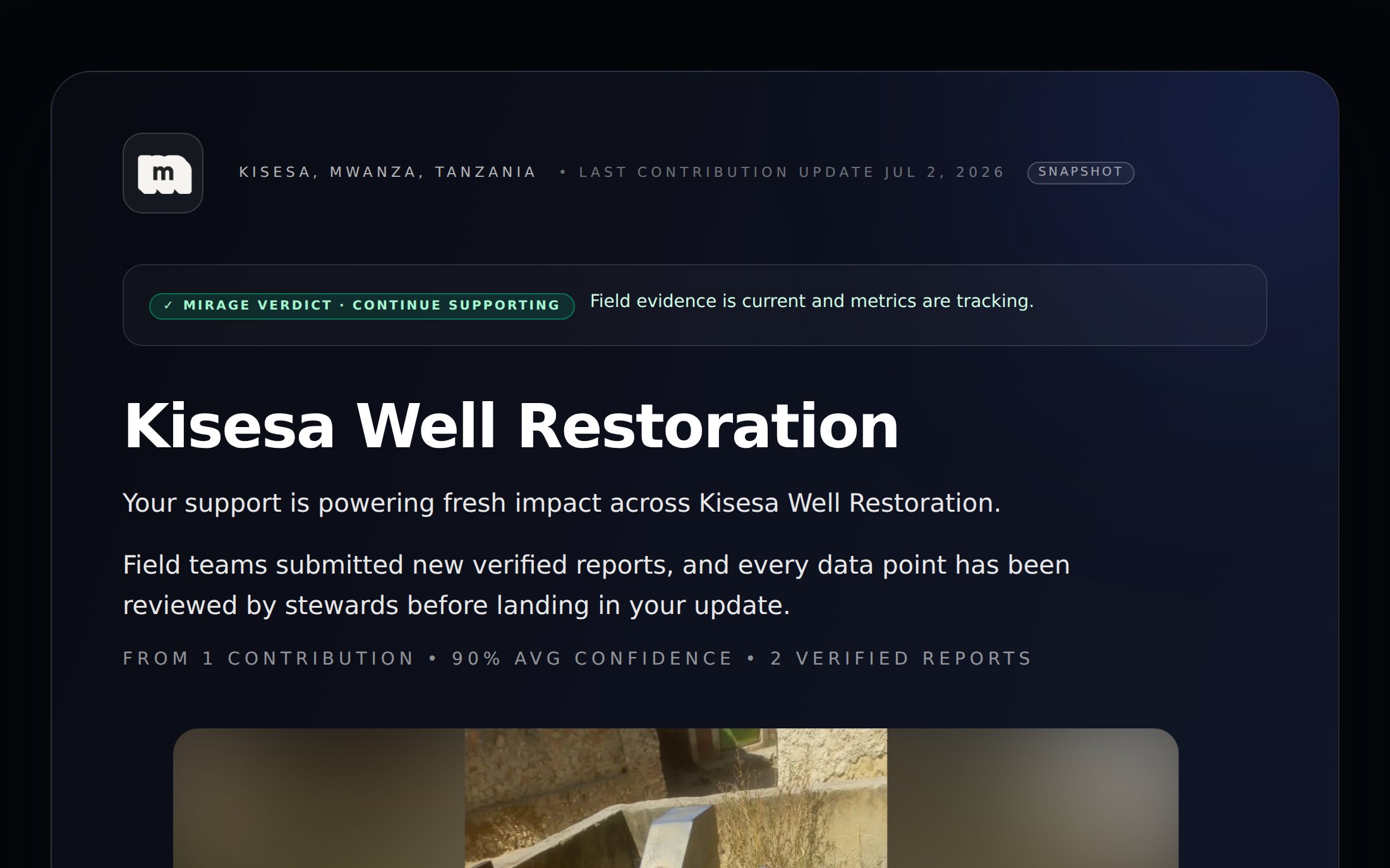
From the project page, generate a donor report. Mirage assembles your approved metrics, verified photos, and an AI-written narrative into a polished public page. Copy the link and send it to a donor, no login required on their end.
The payoff: a public, donor-ready impact page built from your verified field data.
Submit your organization’s documents to earn the verified badge donors see on your reports.
Schedule revisits
Prove sustained impact by scheduling follow-up verification visits months down the line.
Personalize for donors
Add donor profiles with their priorities so generated reports speak to what they care about.
Plans & billing
Subscribe to a plan and manage billing when you’re ready to go beyond the trial.
{"docsConfig":{"theme":"mint","$schema":"https://mintlify.com/docs.json","name":"Mirage","description":"Mirage documentation — AI-enabled impact reporting for nonprofits. Set up your organization, deploy field reporters, review verified evidence, and share donor-ready impact reports.","colors":{"primary":"#00658d","light":"#81cfff","dark":"#002045"},"logo":{"light":"https://mintcdn.com/mirage/bZ0dMyjd1Rmqwkad/logo/mirage-logo.png?fit=max\u0026auto=format\u0026n=bZ0dMyjd1Rmqwkad\u0026q=85\u0026s=6f09d4729e70ff4384e8f80001f26676","dark":"https://mintcdn.com/mirage/bZ0dMyjd1Rmqwkad/logo/mirage-logo.png?fit=max\u0026auto=format\u0026n=bZ0dMyjd1Rmqwkad\u0026q=85\u0026s=6f09d4729e70ff4384e8f80001f26676"},"favicon":"https://mintcdn.com/mirage/bZ0dMyjd1Rmqwkad/logo/mirage-logo.png?fit=max\u0026auto=format\u0026n=bZ0dMyjd1Rmqwkad\u0026q=85\u0026s=6f09d4729e70ff4384e8f80001f26676","navbar":{"links":[{"href":"https://app.mirage.partners/login","label":"Sign in"}],"primary":{"type":"button","label":"Open Dashboard","href":"https://app.mirage.partners"}},"footer":{"socials":{"website":"https://www.mirage.partners"}},"contextual":{"options":["copy","view","chatgpt","claude","perplexity","mcp","cursor","vscode"],"display":"header"},"styling":{"latex":false},"navigation":{"pages":[]}},"deployment":{"deploymentMetadataValue":{"subdomain":"mirage","hasAudioNarration":false,"actualSubdomain":"mirage","customDomains":[],"gitSource":{"type":"github","owner":"johnnygarcai","repo":"mintlify-docs","deployBranch":"main","contentDirectory":"","isPrivate":true,"mountPath":"","label":""},"entitlements":{},"buildId":"6ae95b6b851e4a4bc8d5e11a:success","clientVersion":"0.0.4094","searchFilterCounts":[{"language":"default","tag":"Projects \u0026 Reporting","count":5},{"language":"default","tag":"Your Organization","count":4},{"language":"default","tag":"Getting Started","count":3},{"language":"default","tag":"Donor Reports","count":3},{"language":"default","tag":"For Field Reporters","count":2},{"language":"default","tag":"Support","count":1},{"language":"default","tag":"Product updates","count":1}]},"assistantConfig":{"enableAskAiButton":false,"enableStarterQuestions":false,"enableContextualStarterQuestions":false,"enableAskAiSearchBar":true},"basePath":"","hasChatPermissions":false,"hasWebMcpPermissions":false,"toggles":[{"name":"kill-isr","enabled":true,"variant":{"name":"disabled","enabled":false,"feature_enabled":true},"impressionData":false},{"name":"custom-rbac-roles","enabled":true,"variant":{"name":"disabled","enabled":false,"feature_enabled":true},"impressionData":false},{"name":"agent-mintlify-slack","enabled":true,"variant":{"name":"disabled","enabled":false,"feature_enabled":true},"impressionData":false},{"name":"agent-integrations-settings","enabled":true,"variant":{"name":"disabled","enabled":false,"feature_enabled":true},"impressionData":false},{"name":"rbac-expansion","enabled":true,"variant":{"name":"disabled","enabled":false,"feature_enabled":true},"impressionData":false},{"name":"automations-pr-grouping","enabled":true,"variant":{"name":"disabled","enabled":false,"feature_enabled":true},"impressionData":false},{"name":"custom-prefix","enabled":true,"variant":{"name":"disabled","enabled":false,"feature_enabled":true},"impressionData":false},{"name":"analytics-v7","enabled":true,"variant":{"name":"disabled","enabled":false,"feature_enabled":true},"impressionData":false},{"name":"user-flows-analytics","enabled":true,"variant":{"name":"disabled","enabled":false,"feature_enabled":true},"impressionData":false},{"name":"no-publish-flow","enabled":true,"variant":{"name":"disabled","enabled":false,"feature_enabled":true},"impressionData":false},{"name":"workos-onboarding","enabled":true,"variant":{"name":"disabled","enabled":false,"feature_enabled":true},"impressionData":false},{"name":"snapshot-serving-live","enabled":true,"variant":{"name":"disabled","enabled":false,"feature_enabled":true},"impressionData":false},{"name":"stripTemperatureMiddleware","enabled":true,"variant":{"name":"disabled","enabled":false,"feature_enabled":true},"impressionData":false},{"name":"support-platform-pylon-zendesk","enabled":true,"variant":{"name":"disabled","enabled":false,"feature_enabled":true},"impressionData":false},{"name":"snapshot-serving","enabled":true,"variant":{"name":"disabled","enabled":false,"feature_enabled":true},"impressionData":false},{"name":"instant-rollback","enabled":true,"variant":{"name":"disabled","enabled":false,"feature_enabled":true},"impressionData":false},{"name":"granular-notifications-server","enabled":true,"variant":{"name":"disabled","enabled":false,"feature_enabled":true},"impressionData":false},{"name":"granular-notifications","enabled":true,"variant":{"name":"disabled","enabled":false,"feature_enabled":true},"impressionData":false},{"name":"automations-fable","enabled":true,"variant":{"name":"disabled","enabled":false,"feature_enabled":true},"impressionData":false},{"name":"fixed-ai-action-pricing","enabled":true,"variant":{"name":"disabled","enabled":false,"feature_enabled":true},"impressionData":false},{"name":"automation-resolve-merge-conflict","enabled":true,"variant":{"name":"disabled","enabled":false,"feature_enabled":true},"impressionData":false},{"name":"scoped-publishing","enabled":true,"variant":{"name":"disabled","enabled":false,"feature_enabled":true},"impressionData":false},{"name":"mintql","enabled":true,"variant":{"name":"disabled","enabled":false,"feature_enabled":true},"impressionData":false},{"name":"page-level-analytics","enabled":true,"variant":{"name":"disabled","enabled":false,"feature_enabled":true},"impressionData":false},{"name":"editor-version-history-v2","enabled":true,"variant":{"name":"disabled","enabled":false,"feature_enabled":true},"impressionData":false},{"name":"billing-page-v2","enabled":true,"variant":{"name":"disabled","enabled":false,"feature_enabled":true},"impressionData":false},{"name":"full-page-search","enabled":true,"variant":{"name":"disabled","enabled":false,"feature_enabled":true},"impressionData":false},{"name":"workspace-projects","enabled":true,"variant":{"name":"disabled","enabled":false,"feature_enabled":true},"impressionData":false},{"name":"assistant-v5","enabled":true,"variant":{"name":"disabled","enabled":false,"feature_enabled":true},"impressionData":false},{"name":"fork-pr-previews","enabled":true,"variant":{"name":"disabled","enabled":false,"feature_enabled":true},"impressionData":false},{"name":"revalidation-jwt","enabled":true,"variant":{"name":"disabled","enabled":false,"feature_enabled":true},"impressionData":false},{"name":"workos-sso-scim","enabled":true,"variant":{"name":"disabled","enabled":false,"feature_enabled":true},"impressionData":false},{"name":"hobby-abuse-scan","enabled":true,"variant":{"name":"disabled","enabled":false,"feature_enabled":true},"impressionData":false},{"name":"dashboard-inbox","enabled":true,"variant":{"name":"disabled","enabled":false,"feature_enabled":true},"impressionData":false},{"name":"workos-signup","enabled":true,"variant":{"name":"disabled","enabled":false,"feature_enabled":true},"impressionData":false},{"name":"turbopuffer-dual-write","enabled":true,"variant":{"name":"disabled","enabled":false,"feature_enabled":true},"impressionData":false},{"name":"workos-enabled","enabled":true,"variant":{"name":"disabled","enabled":false,"feature_enabled":true},"impressionData":false},{"name":"approve-review-flow","enabled":true,"variant":{"name":"disabled","enabled":false,"feature_enabled":true},"impressionData":false},{"name":"editor-metadata","enabled":true,"variant":{"name":"disabled","enabled":false,"feature_enabled":true},"impressionData":false},{"name":"sso-setup-deadline-banner","enabled":true,"variant":{"name":"disabled","enabled":false,"feature_enabled":true},"impressionData":false},{"name":"turbopuffer-serve","enabled":true,"variant":{"name":"disabled","enabled":false,"feature_enabled":true},"impressionData":false},{"name":"live-agents","enabled":true,"variant":{"name":"disabled","enabled":false,"feature_enabled":true},"impressionData":false},{"name":"llms-txt-v2","enabled":true,"variant":{"name":"disabled","enabled":false,"feature_enabled":true},"impressionData":false}],"googleFontsInlined":false},"customCss":[],"page":{"pagePath":"quickstart","slug":"/quickstart","pageMetadata":{"title":"Quickstart","description":"Go from a new account to your first shared donor report","icon":"rocket","href":"/quickstart"},"description":{"compiledSource":"\"use strict\";\nconst {jsx: _jsx} = arguments[0];\nconst {useMDXComponents: _provideComponents} = arguments[0];\nfunction _createMdxContent(props) {\n const _components = {\n p: \"p\",\n ..._provideComponents(),\n ...props.components\n };\n return _jsx(_components.p, {\n children: \"Go from a new account to your first shared donor report\"\n });\n}\nfunction MDXContent(props = {}) {\n const {wrapper: MDXLayout} = {\n ..._provideComponents(),\n ...props.components\n };\n return MDXLayout ? _jsx(MDXLayout, {\n ...props,\n children: _jsx(_createMdxContent, {\n ...props\n })\n }) : _createMdxContent(props);\n}\nreturn {\n default: MDXContent\n};\n","frontmatter":{},"scope":{}},"pageType":"default","mdx":{"mdxSource":{"compiledSource":"\"use strict\";const{Fragment:_Fragment,jsx:_jsx,jsxs:_jsxs}=arguments[0];const{useMDXComponents:_provideComponents}=arguments[0];function _createMdxContent(props){const _components={a:`a`,li:`li`,p:`p`,strong:`strong`,ul:`ul`,..._provideComponents(),...props.components},{Card,CardGroup,Check,Frame,Heading,OptimizedImage,Step,Steps}=_components;if(!Card)_missingMdxReference(`Card`,true);if(!CardGroup)_missingMdxReference(`CardGroup`,true);if(!Check)_missingMdxReference(`Check`,true);if(!Frame)_missingMdxReference(`Frame`,true);if(!Heading)_missingMdxReference(`Heading`,true);if(!OptimizedImage)_missingMdxReference(`OptimizedImage`,true);if(!Step)_missingMdxReference(`Step`,true);if(!Steps)_missingMdxReference(`Steps`,true);return _jsxs(_Fragment,{children:[_jsx(_components.p,{children:`This guide walks the full golden path: create your account and organization, set up a project, deploy a field reporter, review their first report, and share a donor-ready impact page.`}),`\n`,_jsx(Heading,{level:`2`,id:`prerequisites`,children:`Prerequisites`}),`\n`,_jsxs(_components.ul,{children:[`\n`,_jsx(_components.li,{children:`A modern browser (Chrome, Safari, Firefox, or Edge)`}),`\n`,_jsx(_components.li,{children:`At least one person who can act as a field reporter (a teammate works fine for your first run)`}),`\n`]}),`\n`,_jsx(Heading,{level:`2`,id:`the-golden-path`,children:`The golden path`}),`\n`,_jsxs(Steps,{children:[_jsx(Step,{title:`Create your account`,children:_jsxs(_components.p,{children:[`Go to `,_jsx(_components.a,{href:`https://app.mirage.partners`,children:`app.mirage.partners`}),` and sign up with your email or Google account. First-time users land on a welcome screen that points you to organization setup.`]})}),_jsxs(Step,{title:`Create your organization`,children:[_jsxs(_components.p,{children:[`Give your organization a name, description, website, location, and contact details, and upload a logo if you have one handy. You’re automatically added as a `,_jsx(_components.strong,{children:`steward`}),`, the admin role that manages everything else in this guide.`]}),_jsxs(_components.p,{children:[`See `,_jsx(_components.a,{href:`/organization/create-your-organization`,children:`Create your organization`}),` for the full walkthrough.`]})]}),_jsxs(Step,{title:`Create your first project`,children:[_jsxs(_components.p,{children:[`From your organization’s `,_jsx(_components.strong,{children:`Projects`}),` page, create a project: a title, a short summary, a location, and the metrics you want to track (for example “Wells dug” or ”% of households with clean water access”).`]}),_jsxs(_components.p,{children:[`Metrics are the backbone of everything downstream. `,_jsx(_components.a,{href:`/projects/defining-metrics`,children:`Defining metrics`}),` explains the options.`]})]}),_jsxs(Step,{title:`Create a reporting task`,children:[_jsxs(_components.p,{children:[`Inside the project, create a `,_jsx(_components.strong,{children:`reporting task`}),`: the work unit your field reporters respond to. Write clear instructions, add the questions you want answered, and toggle which evidence you need: photos, video, or audio.`]}),_jsxs(_components.p,{children:[`See `,_jsx(_components.a,{href:`/projects/reporting-tasks`,children:`Reporting tasks`}),`.`]})]}),_jsxs(Step,{title:`Deploy your field reporters`,children:[_jsxs(_components.p,{children:[`From your organization’s `,_jsx(_components.strong,{children:`People`}),` page, generate a 6-character `,_jsx(_components.strong,{children:`invite code`}),` and share it with your reporters: in person, over SMS, or as a printable QR card. Reporters join at `,_jsx(_components.a,{href:`https://report.mirage.partners`,children:`report.mirage.partners`}),` by entering the code, and your tasks appear on their dashboard immediately.`]}),_jsxs(_components.p,{children:[`See `,_jsx(_components.a,{href:`/organization/team-and-field-reporters`,children:`Team \u0026 field reporters`}),`.`]})]}),_jsxs(Step,{title:`Review the first submission`,children:[_jsxs(_components.p,{children:[`When a reporter submits, the report shows up in your organization’s `,_jsx(_components.strong,{children:`Approvals`}),` queue. Mirage’s AI will have already analyzed the evidence and proposed metric values with confidence scores. Review the answers and media, then `,_jsx(_components.strong,{children:`approve or reject`}),` each proposed contribution; only approved data counts toward your project metrics.`]}),_jsxs(_components.p,{children:[`See `,_jsx(_components.a,{href:`/projects/reviewing-reports`,children:`Reviewing reports`}),`.`]})]}),_jsxs(Step,{title:`Generate and share a donor report`,children:[_jsxs(_components.p,{children:[`From the project page, generate a `,_jsx(_components.strong,{children:`donor report`}),`. Mirage assembles your approved metrics, verified photos, and an AI-written narrative into a polished public page. Copy the link and send it to a donor, no login required on their end.`]}),_jsx(Frame,{caption:`The payoff: a public, donor-ready impact page built from your verified field data.`,children:_jsx(OptimizedImage,{src:`https://mintcdn.com/mirage/eVR3n30GbOeZdkdj/images/donor-report-hero.png?fit=max\u0026auto=format\u0026n=eVR3n30GbOeZdkdj\u0026q=85\u0026s=309182d4446ed60a16398ef0333f831e`,alt:`Generated donor report page`,\"data-og-width\":`2200`,width:`2200`,\"data-og-height\":`1374`,height:`1374`,\"data-path\":`images/donor-report-hero.png`,\"data-optimize\":`true`,\"data-opv\":`3`,srcset:`https://mintcdn.com/mirage/eVR3n30GbOeZdkdj/images/donor-report-hero.png?w=280\u0026fit=max\u0026auto=format\u0026n=eVR3n30GbOeZdkdj\u0026q=85\u0026s=fc1a697e9e69cc2d2b7a9360eb0570fa 280w, https://mintcdn.com/mirage/eVR3n30GbOeZdkdj/images/donor-report-hero.png?w=560\u0026fit=max\u0026auto=format\u0026n=eVR3n30GbOeZdkdj\u0026q=85\u0026s=c6f6e64ef83245a00ffa9101dc695e26 560w, https://mintcdn.com/mirage/eVR3n30GbOeZdkdj/images/donor-report-hero.png?w=840\u0026fit=max\u0026auto=format\u0026n=eVR3n30GbOeZdkdj\u0026q=85\u0026s=4434ec11f098de1659481967dea262f0 840w, https://mintcdn.com/mirage/eVR3n30GbOeZdkdj/images/donor-report-hero.png?w=1100\u0026fit=max\u0026auto=format\u0026n=eVR3n30GbOeZdkdj\u0026q=85\u0026s=219e97fb5189a44a5e0f9d5735fd117c 1100w, https://mintcdn.com/mirage/eVR3n30GbOeZdkdj/images/donor-report-hero.png?w=1650\u0026fit=max\u0026auto=format\u0026n=eVR3n30GbOeZdkdj\u0026q=85\u0026s=916d82262cf07c19c0124161b430c3b7 1650w, https://mintcdn.com/mirage/eVR3n30GbOeZdkdj/images/donor-report-hero.png?w=2500\u0026fit=max\u0026auto=format\u0026n=eVR3n30GbOeZdkdj\u0026q=85\u0026s=f0d23e197c4da471074a5317ebe396f3 2500w`})}),_jsxs(_components.p,{children:[`See `,_jsx(_components.a,{href:`/donor-reports/generating-donor-reports`,children:`Generating donor reports`}),`.`]})]})]}),`\n`,_jsx(Check,{children:_jsx(_components.p,{children:`That’s the whole loop: evidence in from the field, verified metrics out to donors. Everything else in these docs is depth on the steps above.`})}),`\n`,_jsx(Heading,{level:`2`,id:`where-to-go-next`,children:`Where to go next`}),`\n`,_jsxs(CardGroup,{cols:2,children:[_jsx(Card,{title:`Get verified`,icon:`badge-check`,href:`/organization/verification`,children:_jsx(_components.p,{children:`Submit your organization’s documents to earn the verified badge donors see on your reports.`})}),_jsx(Card,{title:`Schedule revisits`,icon:`calendar-check`,href:`/projects/revisit-tasks`,children:_jsx(_components.p,{children:`Prove sustained impact by scheduling follow-up verification visits months down the line.`})}),_jsx(Card,{title:`Personalize for donors`,icon:`user-heart`,href:`/donor-reports/managing-donors`,children:_jsx(_components.p,{children:`Add donor profiles with their priorities so generated reports speak to what they care about.`})}),_jsx(Card,{title:`Plans \u0026 billing`,icon:`credit-card`,href:`/organization/plans-and-billing`,children:_jsx(_components.p,{children:`Subscribe to a plan and manage billing when you’re ready to go beyond the trial.`})})]})]})}function MDXContent(props={}){const{wrapper:MDXLayout}={..._provideComponents(),...props.components};return MDXLayout?_jsx(MDXLayout,{...props,children:_jsx(_createMdxContent,{...props})}):_createMdxContent(props)}return{default:MDXContent};function _missingMdxReference(id,component){throw new Error(`Expected `+(component?`component`:`object`)+\" `\"+id+\"` to be defined: you likely forgot to import, pass, or provide it.\")}","frontmatter":{},"scope":{"config":{},"pageMetadata":{"title":"Quickstart","description":"Go from a new account to your first shared donor report","icon":"rocket","href":"/quickstart"}}},"mdxSourceWithNoJs":null},"mdxExtracts":{"tableOfContents":[{"title":"Prerequisites","slug":"prerequisites","depth":2,"children":[]},{"title":"The golden path","slug":"the-golden-path","depth":2,"children":[]},{"title":"Where to go next","slug":"where-to-go-next","depth":2,"children":[]}],"codeExamples":{}},"jsLinks":[],"subdomain":"mirage","siteName":"Mirage","title":"Quickstart - Mirage","navMaps":{"firstHrefInVersion":{},"firstHrefInLanguage":{}},"lastModified":"2026-08-04T16:33:11.009Z","originalFileLocation":"quickstart.mdx"},"headHtml":"\u003cscript data-mint-head>(function(){var d=document.documentElement,p=null;if(!p){try{p=localStorage.getItem(\"isDarkMode\")}catch(e){}if(p==='true')p='dark';else if(p==='false')p='light';if(p!=='light'\u0026\u0026p!=='dark'\u0026\u0026p!=='system')p=\"system\"}var r=p==='system'?(matchMedia(\"(prefers-color-scheme: dark)\").matches?'dark':'light'):p;d.classList.remove(r==='dark'?'light':'dark');d.classList.add(r);d.setAttribute(\"data-theme-preference\",p)})();\u003c/script>\u003cmeta data-mint-head name=\"description\" content=\"Go from a new account to your first shared donor report\">\u003cmeta data-mint-head name=\"application-name\" content=\"Mirage\">\u003cmeta data-mint-head name=\"generator\" content=\"Mintlify\">\u003clink data-mint-head rel=\"icon\" type=\"image/png\" sizes=\"192x192\" href=\"/mintlify-assets/_mintlify/favicons/mirage/Y51QGucvn_yqujD_/_generated/favicon/android-chrome-192x192.png\" media=\"(prefers-color-scheme: light)\">\u003clink data-mint-head rel=\"apple-touch-icon\" type=\"image/png\" sizes=\"180x180\" href=\"/mintlify-assets/_mintlify/favicons/mirage/Y51QGucvn_yqujD_/_generated/favicon/apple-touch-icon.png\">\u003clink data-mint-head rel=\"icon\" type=\"image/png\" sizes=\"16x16\" href=\"/mintlify-assets/_mintlify/favicons/mirage/Y51QGucvn_yqujD_/_generated/favicon/favicon-16x16.png\" media=\"(prefers-color-scheme: light)\">\u003clink data-mint-head rel=\"icon\" type=\"image/png\" sizes=\"32x32\" href=\"/mintlify-assets/_mintlify/favicons/mirage/Y51QGucvn_yqujD_/_generated/favicon/favicon-32x32.png\" media=\"(prefers-color-scheme: light)\">\u003clink data-mint-head rel=\"shortcut icon\" type=\"image/x-icon\" href=\"/mintlify-assets/_mintlify/favicons/mirage/Y51QGucvn_yqujD_/_generated/favicon/favicon.ico\" media=\"(prefers-color-scheme: light)\">\u003clink data-mint-head rel=\"icon\" type=\"image/png\" sizes=\"192x192\" href=\"/mintlify-assets/_mintlify/favicons/mirage/Y51QGucvn_yqujD_/_generated/favicon-dark/android-chrome-192x192.png\" media=\"(prefers-color-scheme: dark)\">\u003clink data-mint-head rel=\"icon\" type=\"image/png\" sizes=\"16x16\" href=\"/mintlify-assets/_mintlify/favicons/mirage/Y51QGucvn_yqujD_/_generated/favicon-dark/favicon-16x16.png\" media=\"(prefers-color-scheme: dark)\">\u003clink data-mint-head rel=\"icon\" type=\"image/png\" sizes=\"32x32\" href=\"/mintlify-assets/_mintlify/favicons/mirage/Y51QGucvn_yqujD_/_generated/favicon-dark/favicon-32x32.png\" media=\"(prefers-color-scheme: dark)\">\u003clink data-mint-head rel=\"shortcut icon\" type=\"image/x-icon\" href=\"/mintlify-assets/_mintlify/favicons/mirage/Y51QGucvn_yqujD_/_generated/favicon-dark/favicon.ico\" media=\"(prefers-color-scheme: dark)\">\u003cmeta data-mint-head property=\"og:title\" content=\"Quickstart - Mirage\">\u003cmeta data-mint-head property=\"og:description\" content=\"Go from a new account to your first shared donor report\">\u003cmeta data-mint-head property=\"og:site_name\" content=\"Mirage\">\u003cmeta data-mint-head property=\"og:url\" content=\"https://mirage.mintlify.app/quickstart\">\u003cmeta data-mint-head property=\"og:type\" content=\"website\">\u003cmeta data-mint-head property=\"og:image\" content=\"https://mirage.mintlify.site/_mintlify/api/og/v2?division=Getting+Started\u0026amp;title=Quickstart\u0026amp;description=Go+from+a+new+account+to+your+first+shared+donor+report\u0026amp;theme=3c2201cb1b62bf33dabe8e93\u0026amp;signature=33ff337e4101ef25d3c07a3bc701be8213cd7c074fcf13b44196e97624a60db4\">\u003cmeta data-mint-head property=\"og:image:width\" content=\"1200\">\u003cmeta data-mint-head property=\"og:image:height\" content=\"630\">\u003cmeta data-mint-head name=\"twitter:card\" content=\"summary_large_image\">\u003cmeta data-mint-head name=\"twitter:title\" content=\"Quickstart - Mirage\">\u003cmeta data-mint-head name=\"twitter:description\" content=\"Go from a new account to your first shared donor report\">\u003cmeta data-mint-head name=\"twitter:image\" content=\"https://mirage.mintlify.site/_mintlify/api/og/v2?division=Getting+Started\u0026amp;title=Quickstart\u0026amp;description=Go+from+a+new+account+to+your+first+shared+donor+report\u0026amp;theme=3c2201cb1b62bf33dabe8e93\u0026amp;signature=33ff337e4101ef25d3c07a3bc701be8213cd7c074fcf13b44196e97624a60db4\">\u003cmeta data-mint-head name=\"twitter:image:width\" content=\"1200\">\u003cmeta data-mint-head name=\"twitter:image:height\" content=\"630\">\u003cmeta data-mint-head name=\"msapplication-config\" content=\"/mintlify-assets/_mintlify/favicons/mirage/Y51QGucvn_yqujD_/_generated/favicon/browserconfig.xml\">\u003cmeta data-mint-head name=\"apple-mobile-web-app-title\" content=\"Mirage\">\u003cmeta data-mint-head name=\"msapplication-TileColor\" content=\"#00658d\">\u003clink data-mint-head rel=\"canonical\" href=\"https://mirage.mintlify.app/quickstart\">\u003clink data-mint-head rel=\"alternate\" type=\"application/xml\" href=\"/sitemap.xml\">\u003clink data-mint-head rel=\"alternate\" type=\"text/markdown\" href=\"/quickstart.md\">\u003cscript data-mint-head type=\"application/ld+json\">{\"@context\":\"https://schema.org\",\"@graph\":[{\"@type\":\"Organization\",\"@id\":\"https://mirage.mintlify.app/#organization\",\"name\":\"Mirage\",\"url\":\"https://mirage.mintlify.app\",\"logo\":{\"@type\":\"ImageObject\",\"url\":\"https://mintcdn.com/mirage/bZ0dMyjd1Rmqwkad/logo/mirage-logo.png?fit=max\u0026auto=format\u0026n=bZ0dMyjd1Rmqwkad\u0026q=85\u0026s=6f09d4729e70ff4384e8f80001f26676\"}},{\"@type\":\"WebSite\",\"@id\":\"https://mirage.mintlify.app#website\",\"name\":\"Mirage\",\"url\":\"https://mirage.mintlify.app\",\"publisher\":{\"@id\":\"https://mirage.mintlify.app/#organization\"}},{\"@type\":\"WebPage\",\"@id\":\"https://mirage.mintlify.app/quickstart#webpage\",\"url\":\"https://mirage.mintlify.app/quickstart\",\"name\":\"Quickstart\",\"description\":\"Go from a new account to your first shared donor report\",\"dateModified\":\"2026-08-04T16:33:11.009Z\",\"isPartOf\":{\"@id\":\"https://mirage.mintlify.app#website\"},\"breadcrumb\":{\"@id\":\"https://mirage.mintlify.app/quickstart#breadcrumb\"}},{\"@type\":\"BreadcrumbList\",\"@id\":\"https://mirage.mintlify.app/quickstart#breadcrumb\",\"itemListElement\":[{\"@type\":\"ListItem\",\"position\":1,\"name\":\"Getting Started\",\"item\":\"https://mirage.mintlify.app/index\"},{\"@type\":\"ListItem\",\"position\":2,\"name\":\"Quickstart\",\"item\":\"https://mirage.mintlify.app/quickstart\"}]},{\"@type\":[\"Article\",\"TechArticle\"],\"@id\":\"https://mirage.mintlify.app/quickstart#article\",\"headline\":\"Quickstart\",\"name\":\"Quickstart\",\"description\":\"Go from a new account to your first shared donor report\",\"url\":\"https://mirage.mintlify.app/quickstart\",\"mainEntityOfPage\":{\"@id\":\"https://mirage.mintlify.app/quickstart#webpage\"},\"dateModified\":\"2026-08-04T16:33:11.009Z\",\"publisher\":{\"@id\":\"https://mirage.mintlify.app/#organization\"},\"isPartOf\":{\"@id\":\"https://mirage.mintlify.app#website\"}}]}\u003c/script>\u003cscript data-mint-head type=\"application/ld+json\">{\"@context\":\"https://schema.org\",\"@type\":\"WebSite\",\"name\":\"Mirage\",\"creator\":{\"@type\":\"Organization\",\"name\":\"Mintlify\",\"url\":\"https://mintlify.com\"}}\u003c/script>","siteName":"Mirage","nav":{"global":null,"groups":[{"group":"Getting Started","pages":[{"title":"Welcome to Mirage","sidebarTitle":"Introduction","description":"AI-enabled impact reporting: turn verified field evidence into donor-ready impact stories","icon":"hand-wave","href":"/index"},{"title":"Quickstart","icon":"rocket","href":"/quickstart"},{"title":"How Mirage works","description":"The building blocks of Mirage and how evidence flows from the field to your donors","icon":"diagram-project","href":"/concepts/how-mirage-works"}]},{"group":"Your Organization","pages":[{"title":"Create your organization","icon":"building","href":"/organization/create-your-organization"},{"title":"Team \u0026 field reporters","icon":"users","href":"/organization/team-and-field-reporters"},{"title":"Organization verification","icon":"badge-check","href":"/organization/verification"},{"title":"Plans \u0026 billing","icon":"credit-card","href":"/organization/plans-and-billing"}]},{"group":"Projects \u0026 Reporting","pages":[{"title":"Creating projects","icon":"folder-plus","href":"/projects/creating-projects"},{"title":"Defining metrics","icon":"chart-simple","href":"/projects/defining-metrics"},{"title":"Reporting tasks","icon":"list-check","href":"/projects/reporting-tasks"},{"title":"Reviewing reports","icon":"clipboard-check","href":"/projects/reviewing-reports"},{"title":"Revisit tasks","icon":"calendar-check","href":"/projects/revisit-tasks"}]},{"group":"Donor Reports","pages":[{"title":"Generating donor reports","icon":"wand-magic-sparkles","href":"/donor-reports/generating-donor-reports"},{"title":"Sharing donor reports","icon":"share-nodes","href":"/donor-reports/sharing-donor-reports"},{"title":"Managing donors","icon":"user-heart","href":"/donor-reports/managing-donors"}]},{"group":"For Field Reporters","pages":[{"title":"Field reporter quickstart","icon":"mobile","href":"/reporters/reporter-quickstart"},{"title":"Submitting field reports","icon":"camera","href":"/reporters/submitting-field-reports"}]},{"group":"Support","pages":[{"title":"FAQ","icon":"circle-question","href":"/support/faq"}]},{"group":"Product updates","pages":[{"title":"Product updates","icon":"sparkles","href":"/updates"}]}]},"basePath":"","title":"Quickstart - Mirage","buildId":"dpl_42LwxxU1kGN114H4XzwGYXa9ZDah","deploymentId":"dpl_42LwxxU1kGN114H4XzwGYXa9ZDah","dynamics":["07c022d89b","a74be98ba7"],"chunks":["Frame-5Xwp92K7.js","DynamicMarkdown-BoyYAA8K.js","zoom-image-lightbox-DkE6VzSN.js","lightbox-handle-r17bVUz3.js"]}